
Club Spotlight - Noosa Pickleball Club
Written by Vice President Katherine Crawford-Gray
Since forming in 2018, our Club (NPC) has grown to over 400 members (more than 150% since 2024). What’s helping us is keeping things simple—listening to our members, planning ahead, and working closely with community partners.
We reached some important milestones early on, particularly through funding. This includes $8,250 from the Community Gambling Benefit Fund to support one of the region’s first dedicated courts, and $250,000 from the Building Better Regions Fund (with Noosa Council) to deliver two permanent courts at the Noosa District Sports Complex.
Like many local clubs, this growth brought challenges!
So, in 2025, we listened to our members with a survey. Their feedback was clear—more places to play, more opportunities to improve, and don’t lose our welcoming, inclusive culture. This shaped our 2026–2030 Strategic Plan, Your Game. Your Club. Your Future.
We’re also investing in our governance—developing a clear charter and introducing simple processes to share the workload and support better decision-making. This will help us stay organised and reduce pressure on our volunteers.
For our members, we’re introducing a structured annual coaching program aligned with Pickleball Australia pathways, to help players progress and support local coaches.
We are looking at ways to involve the local community outside our membership. In 2026, we’re partnering with Noosa Council to deliver Serve it Forward, an intergenerational school holiday program bringing together players aged 15–17 and 55+ in a fun, social environment.
As President Nick Hooper says, “We’re focused on doing the basics well—engaging our members, creating quality opportunities to play, and building something sustainable for the future. It’s a whole-of-club effort.”
Like many clubs, we’re learning as we go—but together, we’re building something special for our community and the future of pickleball.
Click here to learn more about the NPC
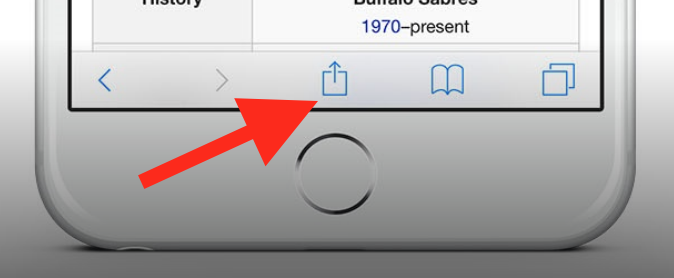
To add this web app to your homescreen, click on the "Share" icon
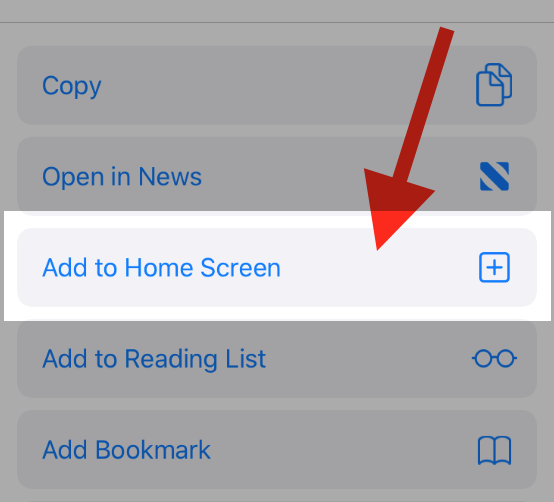
Then click on "Add to Home"
To add this web app to your homescreen, click on the "Share" icon
Then click on "Add to Home"
It looks like your browser doesn't natively support "Add To Homescreen", or you have disabled it (or maybe you have already added this web app to your applications?)
In any case, please check your browser options and information, thanks!
It looks like your browser doesn't natively support "Add To Homescreen", or you have disabled it (or maybe you have already added this web app to your applications?)
In any case, please check your browser options and information, thanks!